

AA Calendar - Planner, Note
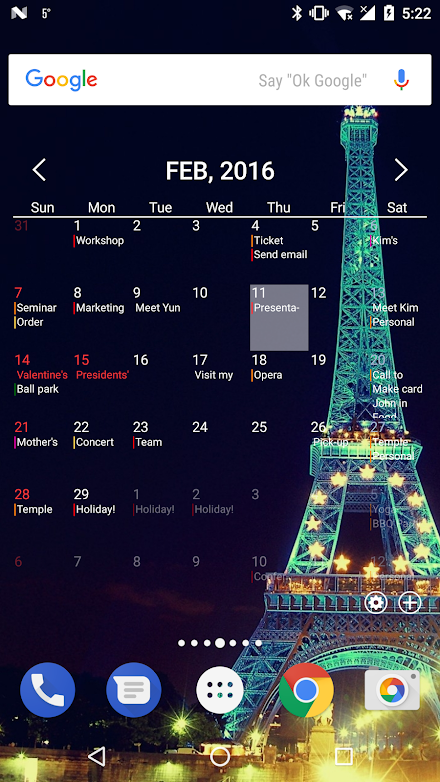
Customizable elements such as header, content background, text color, size, line color, and more.▪ Supports color settings for calendars and schedules.
Not limited to Google Calendars default colors, but over 160,000 colors available for customization.▪ Option to display or hide different types of calendars.▪ Checklists.▪ Importance settings.▪ Saves registered content, locations, and notes in history for quick retrieval.▪ Voice input.▪ Time zone settings.▪ Various repeat options such as daily, bi-weekly, every 3rd Tuesday of the month, annually, etc.▪ File attachment.
Option to automatically save to drive for access even after changing devices.▪ Notification settings.▪ Inviting participants.▪ Settings for sharing my status and schedule.▪ Quick settings without the need to enter the date and time selection window through left/right scroll.▪ Simple view mode for users who dislike complicated options.▪ Quick delete buttons for content, locations, notes, and participants.▪ Memo Linkify support.
Automatically recognizes phone numbers, emails, web pages, locations, etc., and links to related pages when clicked (e.g., clicking a phone number launches the call app and auto-fills the number).Memo:▪ Folder editing and sorting.▪ Freely sort memos and move them to folders.▪ Supports memo widgets.
Customizable elements such as header, content background, text color, size, line color, and more.▪ Memo history.▪ Checklists.Anniversaries:▪ Supports D-day and D+day.▪ Sort by D-day.▪ Repeats annually, monthly, and in leap months.▪ Notification settings for a range from 365 days before to 365 days after.▪ Anniversary history.Search:▪ Full range search (schedule, memo, anniversaries, etc.).▪ When searching schedules, searches not only titles but also memos, locations, and attached filenames.▪ Schedule search options for entire date range or specific date range.▪ Shortcut support.
Clicking a searched item takes you to its location.Backup:▪ Supports backup on local and drive.▪ Supports automatic backup.▪ Backup frequency settings.▪ Option to auto-backup only when connected to WiFi.▪ Backup history.Other:▪ Password setting.▪ Time display format options (24-hour / 12-hour).▪ Option to always display search button on the main menu.▪ Light / Dark themes.▪ Toggle for all notifications.Supported Languages:▪ Korean▪ English▪ Japanese▪ French▪ German▪ Spanish▪ Dutch▪ Hindi▪ ItalianMany more features await you!Guide on the purpose of access permissions:All permissions requested by AA Calendar are optional, not mandatory.
However, we strongly recommend allowing all permissions for full utilization of its powerful features.▪ Calendar: Sync with Google Calendar and add/edit Google Calendar events.▪ Music and audio: Voice recording for attaching to files.▪ Contacts: Access contact details when inviting participants.▪ Notifications: Display notifications at the set time.AA Calendar is the new name of AA Task.
About AA Calendar - Planner, Note
- Package name (App ID)
- my.Frank
- Available on
- Google Play
- Price
- Free
- Developer
- c-shock
Looking for the AA Calendar - Planner, Note APK?
The safest way to get AA Calendar - Planner, Note (my.Frank) on your Android device is to install it directly from Google Play — you'll always get the latest official version, automatic updates, and no risk of modified or infected APK files from third-party sites.

Music Features
Enjoy high-quality music streaming and playback features.
Social Features
Connect and share with friends and the community.
Gaming Features
Enjoy immersive gaming experience with various game modes.
See AA Calendar - Planner, Note in Action


Frequently Asked Questions
Is AA Calendar - Planner, Note free?
Yes, AA Calendar - Planner, Note is free to download and install on Android through Google Play.
How do I install AA Calendar - Planner, Note on Android?
Open Google Play on your Android phone or tablet, search for AA Calendar - Planner, Note by c-shock or tap the Google Play button on this page, then tap Install. The app downloads and installs automatically.
What is my.Frank?
my.Frank is the App ID (package name) of AA Calendar - Planner, Note on Google Play. Every Android app has a unique package name, and it is the safest way to verify you are installing the official app.
Is AA Calendar - Planner, Note safe to download?
Installing AA Calendar - Planner, Note from Google Play is the safest option: you get the official version published by c-shock, verified by Google Play Protect, with automatic updates. Avoid APK files from unofficial third-party sites.

Get AA Calendar - Planner, Note Today
AA Calendar - Planner, Note for Android — free download on Google Play.
Compatible with Android phones and tablets — available on Google Play.
Ask AI about this app
Get instant answers about features, tips and more from popular AI assistants.